
Ergonomic Office Guide
If you sit for much of the working day, choose an office chair for fit before features. Seat depth, lumbar position, armrest range and the way the chair lets you change posture matter more at hour six than a long specification list does at minute five.

A chair for long desk sessions should be easy to fit to your body and easy to move in, not simply soft.
Quick answer: how do you choose an office chair for long hours?
Start with the hours you actually sit, then check whether the chair can match your body: adjustable seat height and depth, lumbar support that reaches your lower back, armrests that work with your desk, and a recline or tilt system that lets you change position. For a dedicated long-hours workstation, ATLAS is the strongest fit in this COLAMY EU shortlist. ATLAS-01 is the balanced everyday option, while AETHER suits a lighter, mid-back setup and smaller rooms.
Start with your working day, not the chair
One of the most useful ideas in European office-seating guidance is that a chair should match the work being done and the person doing it. Kinnarps, for example, separates chair choice by how many hours a day the chair is used, while Flokk frames long-hours seating around fit, movement and task rather than feature count alone.
That is a better place to start than asking which chair looks the most "ergonomic". Someone who works at a fixed desk for seven hours, writes reports and takes long video calls has a different brief from someone who works from a bedroom desk for three hours and spends the rest of the day moving between meetings.
For long sitting days, the chair has to do three jobs well: fit your body, support position changes and work with the rest of your workstation. No office chair makes eight uninterrupted hours of sitting a good idea. EU-OSHA guidance on prolonged static sitting stresses changing posture, getting up regularly and building movement into the day. Think of the chair as the supportive base of a moving work routine, not a reason to stay still.
The 7-point check for choosing an office chair for sitting long hours
1. Make sure the seat height works with your desk
Seat height is basic, but it sets up everything that follows. When the chair is too high, feet can lose support and pressure builds under the thighs. When it is too low, knees rise and the relationship between elbows and the work surface becomes awkward.
Set the chair so your feet are supported and your shoulders can stay relaxed when your hands are at the keyboard. If a fixed-height desk is too tall for you, a stable footrest can help you keep both feet supported while raising the chair to a better working height. German workplace guidance from BAuA makes the same point: desk, chair, keyboard and screen should be considered together rather than as separate objects.
2. Treat seat depth as a fit measurement, not an extra
Seat depth is one of the easiest specs to overlook online and one of the fastest ways to discover that a chair does not fit you. Sit fully back so you can actually use the lumbar support. Your thighs should feel supported without the front edge of the seat crowding the backs of your knees.
A sliding seat pan gives you room to tune that relationship. This matters even more when a chair is shared, when the user is particularly tall or short, or when a fixed-depth chair has made you perch forwards in the past. ATLAS and ATLAS-01 both provide adjustable seat depth; AETHER lists a 6 cm seat-depth adjustment range.

Check the adjustment range against your body and desk before choosing a chair for long daily use.
3. Look for lumbar support you can position, not just a visible lumbar pad
The phrase "lumbar support" tells you very little by itself. The useful question is whether that support meets the inward curve of your lower back when you sit normally. A dramatic pad in the wrong place can feel more distracting than supportive.
For long hours, adjustability is valuable because your body is not a factory setting. ATLAS, ATLAS-01 and AETHER all include adjustable lumbar support, giving you more scope to find a position that feels natural rather than forcing yourself against a fixed shape.
4. Choose armrests around how you actually work
Armrests can reduce the amount of unsupported weight hanging from the shoulders, but only if they can meet your arms without pushing your shoulders upwards or preventing you from getting close to the desk.
For typing-heavy work, multi-directional armrests are useful because the best position for a keyboard is not always the best position for a phone, tablet or reclined call. All three chairs in this guide use 4D adjustable armrests. Set them after seat height and desk position, then check that you can still sit close enough to the work surface.
5. Prioritise movement and recline over one "perfect" posture
Long-hours comfort is not about finding a single angle and holding it all day. European workplace guidance increasingly emphasises dynamic sitting and position changes. A useful recline or tilt mechanism gives you supported alternatives for reading, thinking, calls and short resets between focused tasks.
ATLAS currently lists four lockable positions at 105 / 115 / 123 / 130 degrees. ATLAS-01 lists 107 / 115 / 123 / 132 degrees. AETHER offers four lock positions at 105 / 110 / 118 / 120 degrees. The deeper recline of the two ATLAS models makes more sense for people who regularly lean back between concentrated tasks, while AETHER keeps the movement range more compact.
6. Decide whether you actually need a high back and headrest
A high-back chair is not automatically better. It is simply better suited to certain work habits. If you recline regularly, take long calls or like upper-back and head support, the high-back ATLAS and ATLAS-01 are the natural choices here. If you stay more upright, value freedom around the shoulders or want less visual bulk in the room, a mid-back design can be the better fit.
AETHER deliberately removes the separate headrest and keeps a lower silhouette. In an apartment, student room or open-plan living space, that can matter just as much as an extra adjustment on a spec sheet.
7. Think about heat, texture and the room around the chair
The way a chair feels at 9 a.m. is not always the way it feels at 4 p.m. Breathability, cushion firmness and the amount of contact around your back all change the experience over a long day. Mesh-backed chairs can be appealing in warmer rooms or in homes without strong climate control because air can move behind the torso.
Room fit matters too. Measure the chair at its widest point, check whether the armrests can clear the desk, and leave enough room behind you to recline and move safely. A chair can be ergonomically capable and still be the wrong purchase if it overwhelms the only practical desk corner in the room.
Three COLAMY EU chairs, three different long-hours profiles
The most useful way to compare ATLAS, ATLAS-01 and AETHER is not to rank them as first, second and third. Each one makes more sense for a different kind of working day.
Best for dedicated long-hours workstations
COLAMY ATLAS
If you spend most of the day at one desk and want the most complete long-session package of these three, ATLAS is the place to start. It combines a high back, adjustable headrest, adjustable lumbar support, 4D armrests, adjustable seat depth, multiple recline locks and an aluminium-alloy base.
The current EU product page lists a breathable mesh back, a firmer supportive seat feel and a published maximum load of 300 lb (about 136 kg) in COLAMY's comparison materials. The overall shape is substantial enough for a dedicated office but still visually lighter than a fully upholstered executive chair.

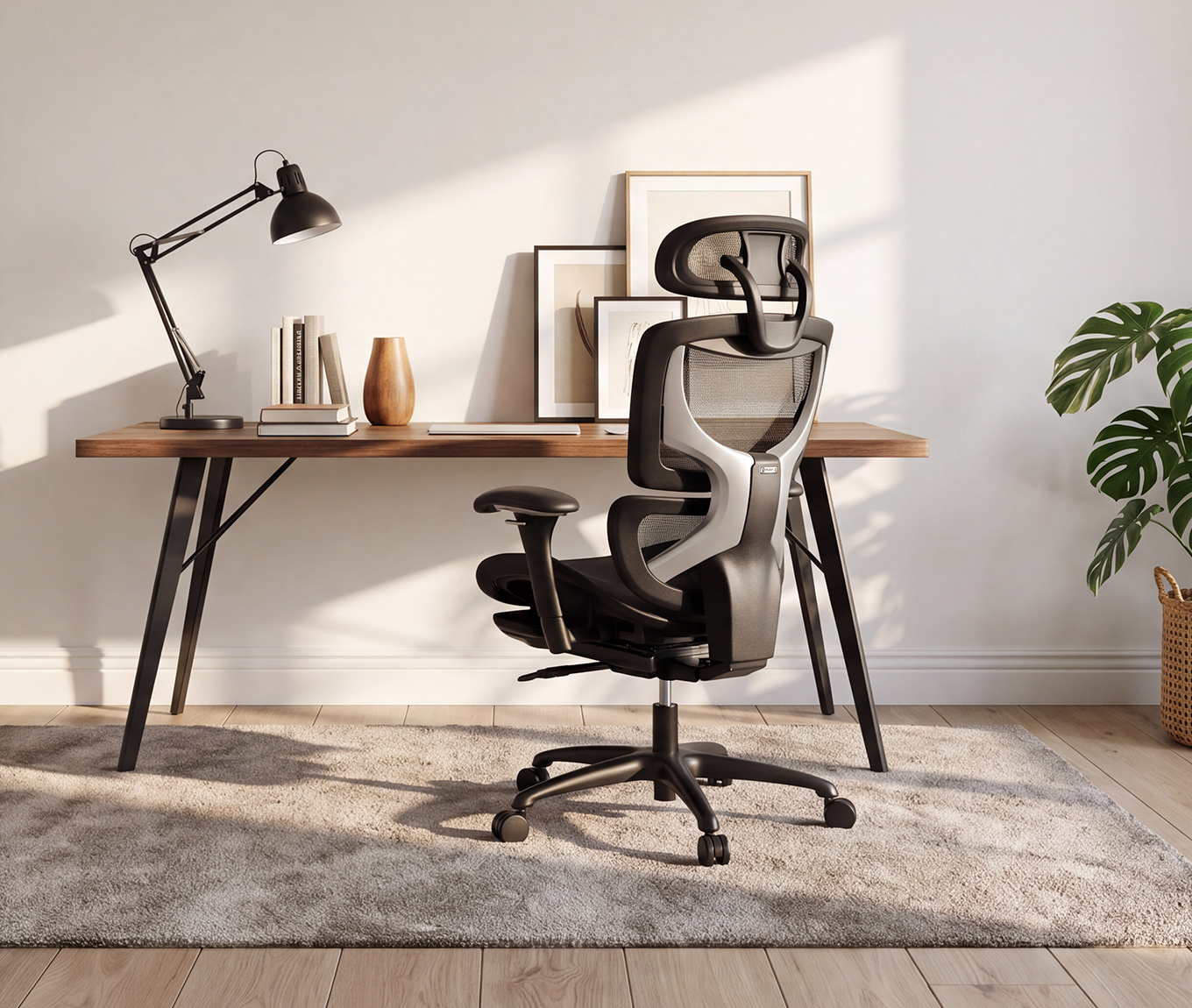
ATLAS is designed around a dedicated workstation, with a high back, headrest and adjustable lower-back support.
Independent test note
Pruefengel tested the COLAMY ATLAS in July 2026 and awarded it 91/100 overall, including 94/100 in the practical-use section. The test praised adjustability, breathability and general stability, while also noting a firm seat cushion and some movement in the headrest and armrests. Pruefengel describes this as a short consumer-use test rather than a laboratory or long-term durability test. It also discloses that manufacturers provide the tested product and pay testing and seal-licensing fees, while stating that these payments do not influence its ratings. Treat the result as an additional real-use data point, not a substitute for checking fit yourself. Read the Pruefengel test.
Choose ATLAS if: your workday includes long stretches of coding, design, writing, finance, study or meetings; you like a high back and headrest; and you want a metal base with a more planted feel.
Best everyday all-rounder
COLAMY ATLAS-01
ATLAS-01 follows much of the same ergonomic logic as ATLAS but in a slightly lighter structural package. You still get a high back, adjustable headrest, adjustable lumbar support, 4D armrests, adjustable seat depth and four lockable recline positions. The most obvious structural difference is the reinforced-nylon base instead of aluminium alloy.
That makes ATLAS-01 easy to picture in a home office that needs to feel like part of the room rather than a separate corporate workstation. It works well for hybrid workers who want strong adjustability but do not necessarily need the more substantial metal-base feel of ATLAS.

ATLAS-01 keeps the high-back ergonomic format while using a lighter reinforced-nylon base.
Choose ATLAS-01 if: you work from home several days a week, want high-back support and a headrest, and prefer a balanced all-rounder rather than the heaviest-looking chair in the room.
Best for compact rooms and a lighter profile
COLAMY AETHER
Not every long-hours desk sits in a dedicated office. Across European apartments and shared homes, workspaces often live in bedrooms, living rooms or compact study corners. That is where AETHER makes the most sense in this trio.
Its mid-back form removes the separate headrest and keeps the silhouette lower, while still offering adjustable lumbar support, 4D armrests, 6 cm of seat-depth adjustment and four recline lock positions. The current EU page lists a 300 lb (about 136 kg) weight capacity.

A mid-back chair can feel easier to live with when the workspace shares a room with the rest of home life.
Choose AETHER if: you want meaningful adjustment without a tall executive-chair presence, you prefer a mid-back chair, or the desk sits in a smaller multi-use room.
ATLAS vs ATLAS-01 vs AETHER: quick comparison
Use the table as a starting point, then check the full product page for the latest dimensions, colour availability and market-specific pricing.
| Feature | ATLAS | ATLAS-01 | AETHER |
|---|---|---|---|
| Best for | Dedicated long sessions | Everyday home office | Compact / multi-use rooms |
| Back style | High back | High back | Mid back |
| Headrest | Yes, adjustable | Yes, adjustable | No separate headrest |
| Lumbar support | Adjustable | Adjustable | Adjustable |
| Armrests | 4D | 4D | 4D |
| Seat depth | Adjustable | Adjustable | Adjustable, 6 cm range |
| Recline locks | 105 / 115 / 123 / 130 deg | 107 / 115 / 123 / 132 deg | 105 / 110 / 118 / 120 deg |
| Base | Aluminium alloy | Reinforced nylon | Plastic |
| Published capacity | 300 lb / approx. 136 kg | 300 lb / approx. 136 kg | 300 lb / approx. 136 kg |
| Listed EU price* | €329,99 | €334,79 | €299,99 |
*Prices checked on the Germany-market view of COLAMY EU on 25 August 2026. Prices, VAT treatment, promotions and availability can vary by country and over time.

The useful question is not how many mechanisms a chair has, but whether those mechanisms let you fit the chair to your work.
How to set up your chair once it arrives
A highly adjustable chair can still feel wrong if it stays in its factory position. Give yourself five minutes before judging it.
- Set seat height first. Support your feet and bring your elbows close to working height without lifting the shoulders.
- Set seat depth next. Sit all the way back and leave a small clearance behind the knees while keeping the thighs supported.
- Move the lumbar support to you. It should meet the lower-back curve without feeling like a hard object pushing you forwards.
- Adjust armrests after the desk position is right. Let the shoulders drop naturally; bring the pads towards the forearms rather than reaching your arms out to the pads.
- Set recline tension and use it. The chair should feel controlled when you lean back, not so stiff that you never move and not so loose that you feel unsupported.

Adjust lumbar support so it meets your lower back naturally; stronger pressure is not automatically better support.
Five buying mistakes that matter more after a long day
Choosing for softness alone. A plush first impression can be pleasant, but fit and pressure distribution matter much more after several hours.
Ignoring seat depth. If the seat is too deep for your legs, you may end up sitting forward and losing the back support you paid for.
Assuming a headrest is essential. Headrests are useful for some people, especially when reclining, but a well-fitted mid-back chair can be the more natural option for an upright worker or compact room.
Locking the chair in one position all day. Support and movement work together. Use the recline, change tasks, stand up and walk when you can.
Expecting the chair to fix the whole workstation. A low laptop, a desk that is too high or a keyboard placed far away can still pull you into an awkward position. The chair, desk, screen and input devices need to work as one setup.
A 30-second decision guide
You sit for long focused blocks at one dedicated desk and like a headrest:
Start with ATLAS.
You want a high-back chair for everyday hybrid or home-office use, but prefer a lighter base:
Start with ATLAS-01.
Your desk shares a bedroom, study corner or living space, and you prefer a mid-back chair:
Start with AETHER.
So, how should you choose an office chair for sitting long hours?
Choose the chair that can be adjusted around the person and the work, not the one with the loudest feature list. Check seat height against the desk, seat depth against your leg length, lumbar position against your lower back, armrests against your typing position, and recline against the way you naturally change posture.
Among these three COLAMY EU options, ATLAS is our starting point for a dedicated long-hours workstation; ATLAS-01 is the more balanced everyday home-office choice; and AETHER is the better match when room scale and a mid-back profile matter.
Then remember the part no product specification can replace: move. EU workplace guidance is increasingly clear that the goal is not to hold a single perfect posture. The better routine is one that lets you sit well, change position and get up regularly.
Find your fit
Compare COLAMY ergonomic office chairs
Explore the current EU range, compare dimensions and choose the chair that fits both your body and the space you work in.
Explore Ergonomic Office ChairsFrequently asked questions
What should I look for in an office chair for long hours?
Prioritise adjustable seat height and depth, lumbar support that can meet your lower back, armrests that work with your desk, a recline or tilt system that allows position changes, and dimensions that fit your body and room. Material and headrest preference come after fit.
Is a high-back office chair better for long hours?
A high back can be useful if you like upper-back support, use a headrest or recline frequently. A mid-back chair can offer a lighter feel and smaller visual footprint. ATLAS and ATLAS-01 are high-back options; AETHER is mid-back.
Is a mesh office chair good for sitting all day?
Mesh can be useful for airflow, especially in warmer rooms, but material alone does not decide long-session comfort. Fit, seat support, lumbar position, armrest range and the ability to change posture matter more.
Do I need adjustable seat depth?
It is especially valuable for long sessions because it helps you support the thighs while keeping clearance behind the knees and remaining fully back against the backrest. It also makes a chair more adaptable across different leg lengths.
Which COLAMY EU chair is best for long focused work?
Within the three models compared here, ATLAS is our starting point for a dedicated long-hours workstation because it combines a high back, adjustable headrest and lumbar support, 4D armrests, adjustable seat depth, multiple recline locks and an aluminium-alloy base.
What does the Pruefengel result for ATLAS mean?
Pruefengel awarded the ATLAS 91/100 overall in a July 2026 consumer-use test, including 94/100 for the practical test. Pruefengel states that its testing is carried out by one or two independent consumers over 7 to 14 days and is not a laboratory or long-term test. It is therefore useful as an extra real-use reference, not as proof that one chair will fit every user.
How often should I move if I work at a desk all day?
There is no single chair setting that removes the need to move. EU-OSHA guidance on prolonged static sitting recommends reducing uninterrupted sitting, changing posture and getting up regularly. Use breaks, calls, water refills and standing tasks as natural opportunities to move.
Where can I compare COLAMY ergonomic office chairs in Europe?
The COLAMY EU ergonomic office chair collection currently includes ATLAS, ATLAS-01, AETHER and AERIX. Product availability, listed price and promotions can vary by country, so select your delivery market on the EU store before ordering.
Sources and further reading
European Agency for Safety and Health at Work: Musculoskeletal disorders and prolonged static sitting
German Federal Institute for Occupational Safety and Health (BAuA): Guidance on mobile and screen-based workstations
Pruefengel: COLAMY ATLAS consumer test, July 2026



Leave a comment
This site is protected by hCaptcha and the hCaptcha Privacy Policy and Terms of Service apply.